↩ Accueil

Vue lecture

Everything New in iOS 26.4 Beta 1

Apple today provided developers with the first beta of an upcoming iOS 26.4 update, which adds quite a few new features to the iPhone. There's a video podcasts feature, updates to Stolen Device Protection, end-to-end encryption for RCS messages, an Apple Music tool for generating playlists, and much more.

We've rounded up everything we've found that's new in the first beta of iOS 26.4. The beta is limited to developers right now, but Apple should release a public beta in the next couple of weeks. iOS 26.4 is expected to launch this spring.

Playlist Playground


‌Apple Music‌ has a new Playlist Playground feature that lets users create a playlist with a text-based prompt.
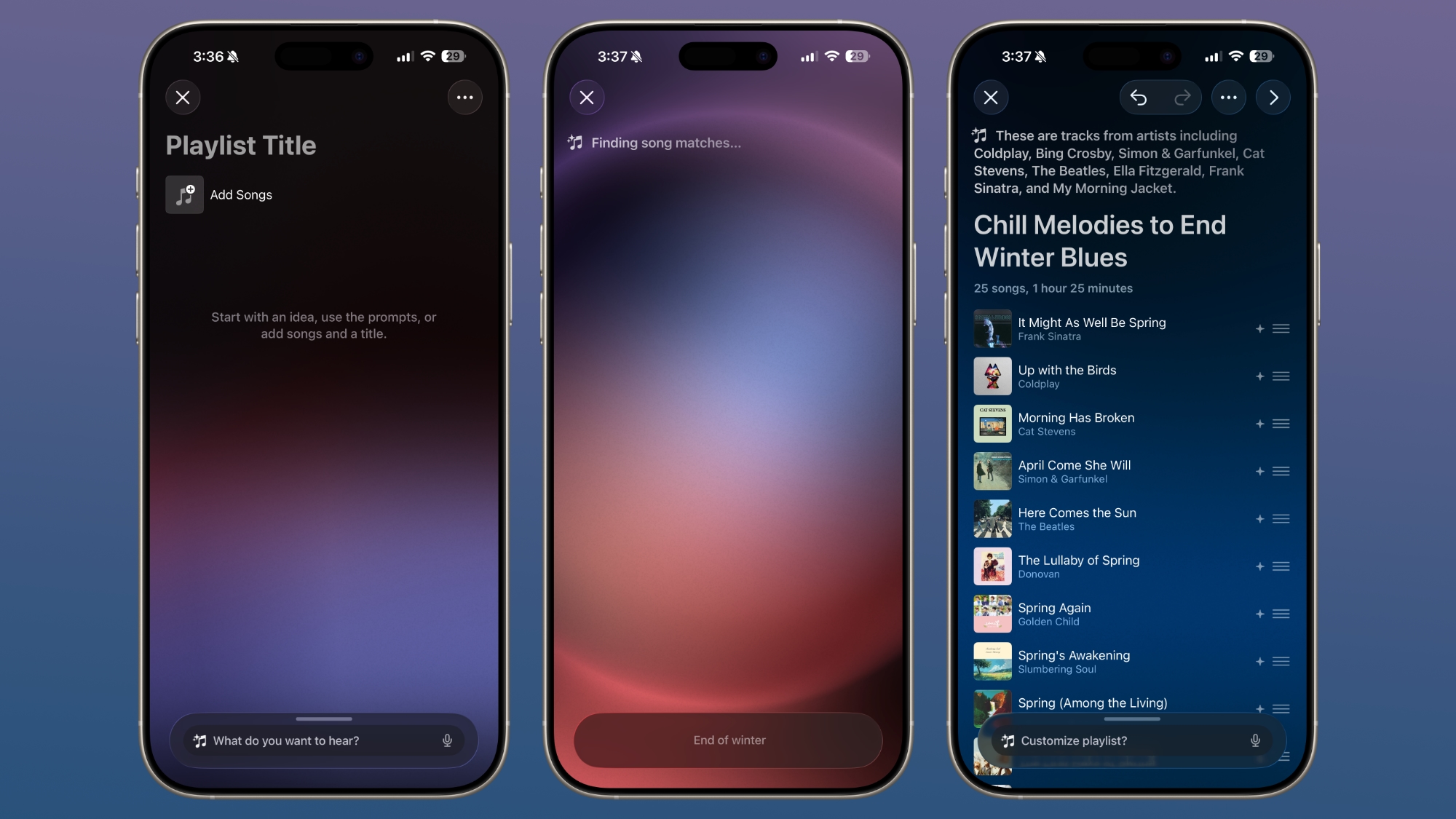

In the ‌Apple Music‌ app, there's an option to type in an idea and get automatic song suggestions for a playlist. Apple has some pre-set suggestions that include "morning coffee music," "hip-hop party songs," and "disco songs that defined the 1970s," but you can type in any idea, mood, or feeling.

From there, the Playlist Playground feature will automatically generate a list of 25 songs, along with a custom title. Playlists that you create can be customized further with additional text prompts, and you can select a cover and a description.

Apple Music


‌Apple Music‌ features a "Concerts Near You" feature that helps you find shows in your area and tour dates for artists that you're a fan of.
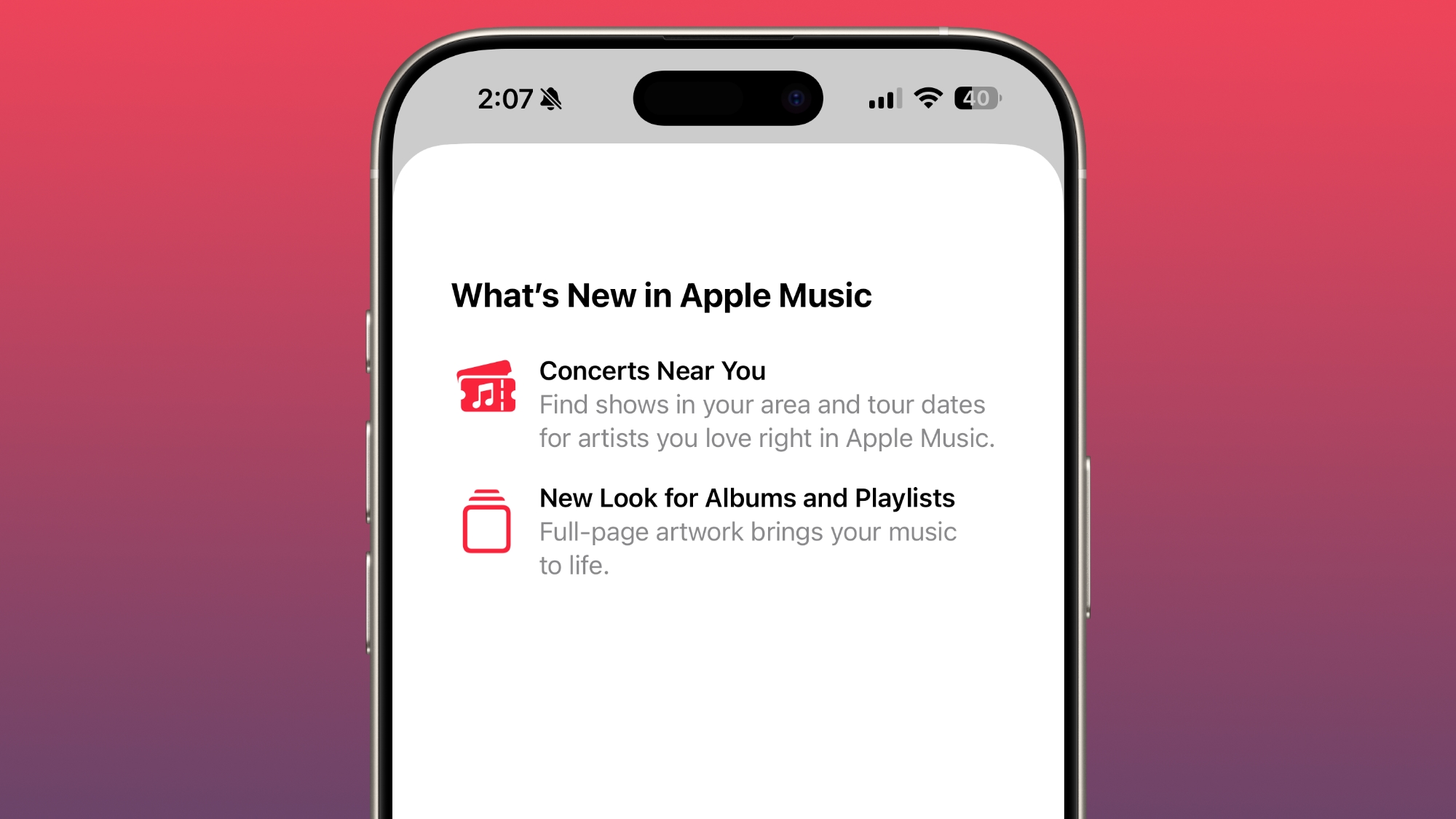

Apple has redesigned albums and playlists, adding full-page artwork.

Apple Podcasts


With iOS 26.4, Apple is adding video podcast capabilities to the Apple Podcasts app. The feature uses HTTP Live Streaming (HLS) to provide podcast creators with "unprecedented control and monetization opportunities" while also providing a high-quality viewing experience.
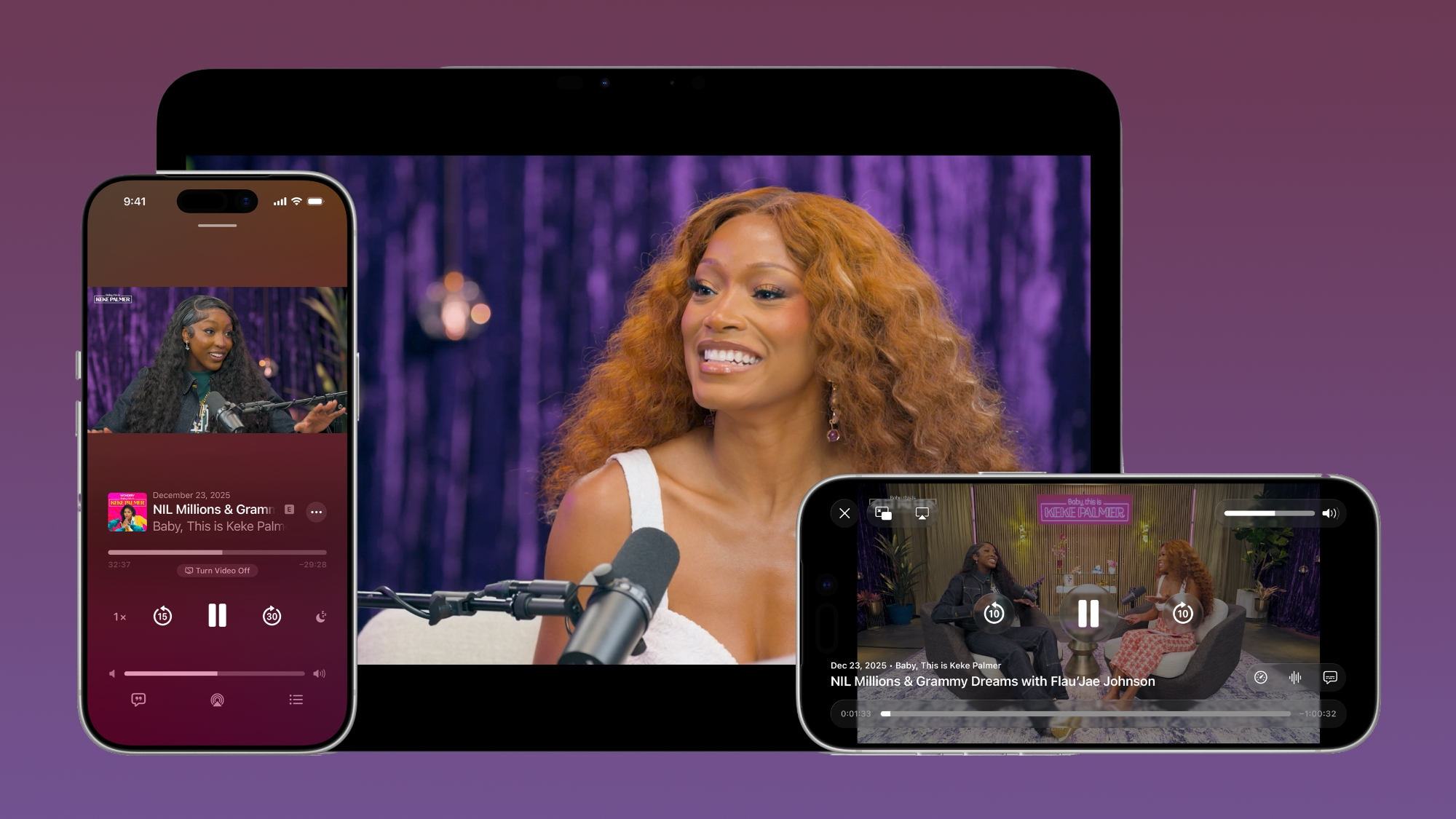

The iOS 26.4 Podcasts app will let users switch between watching and listening to shows, with videos able to be downloaded for offline viewing. HLS ensures smooth playback regardless of network connection, so videos will work on Wi-Fi or cellular. Apple says that the new video episodes will integrate with existing ‌Apple Podcasts‌ features, including personalized recommendations and editorial suggestions in the New and Category sections.

Stolen Device Protection


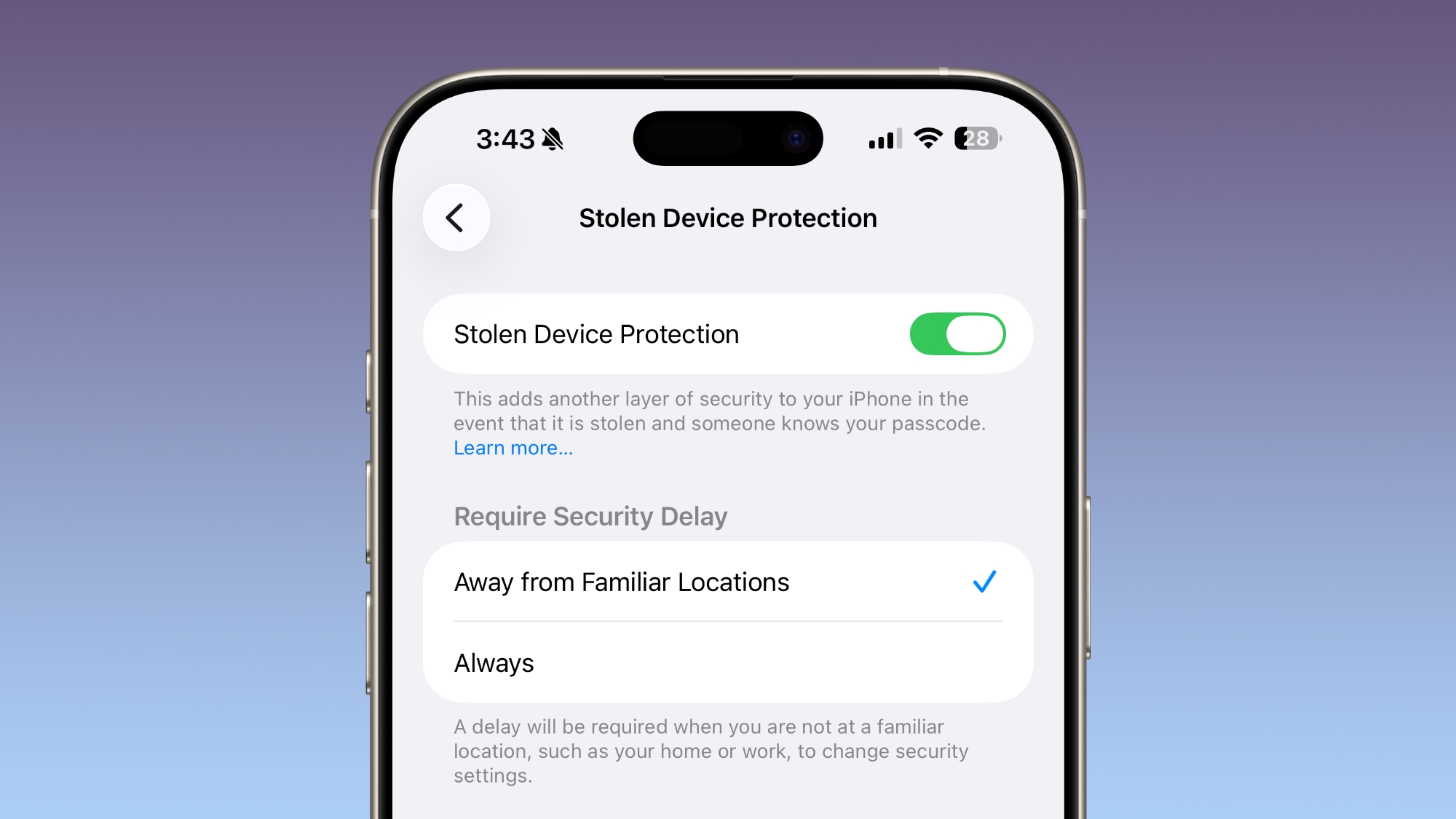
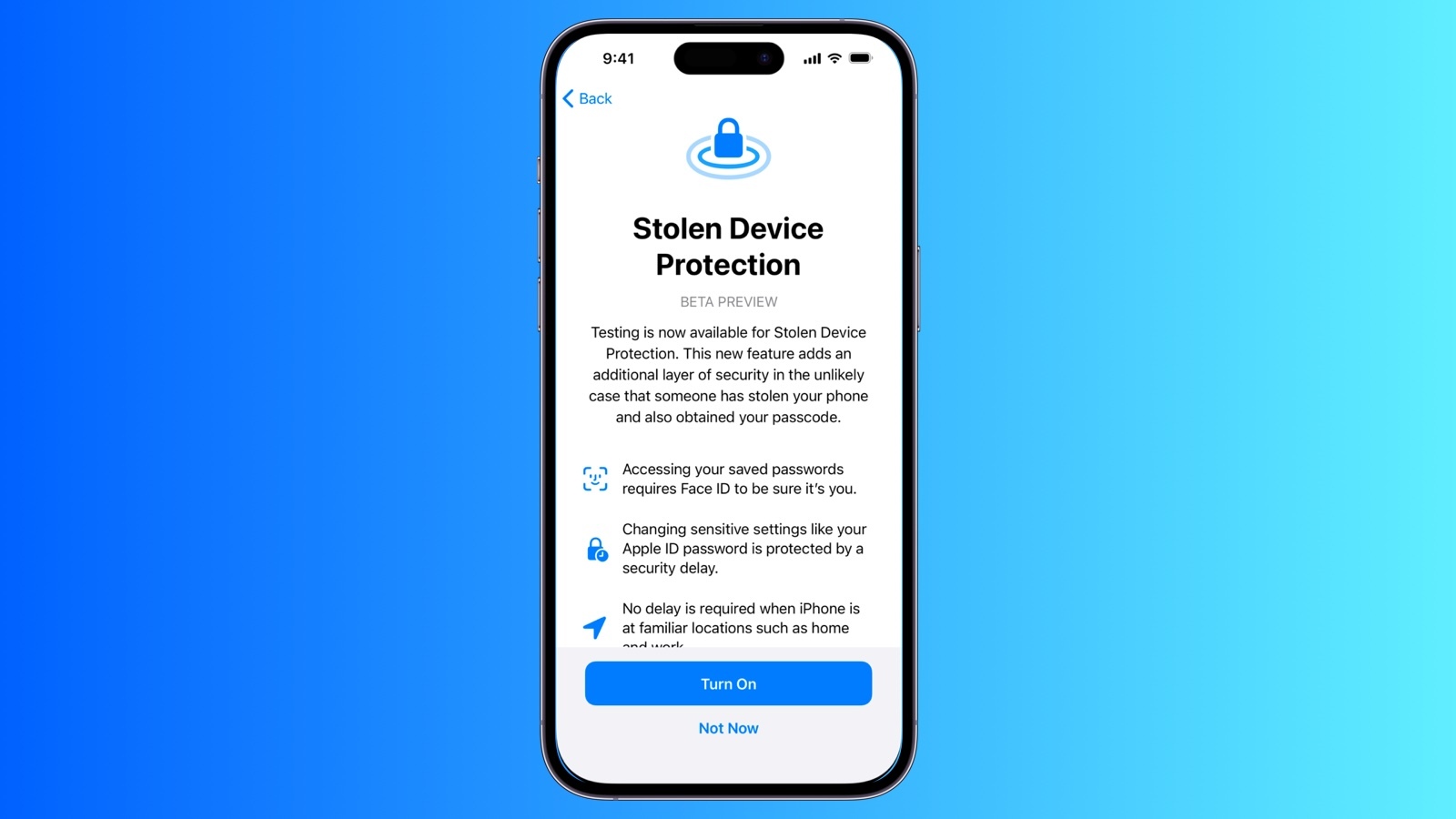
Stolen Device Protection is now enabled by default for all ‌iPhone‌ users, rather than being an opt-in feature.

Apple implemented Stolen Device Protection back in 2023 after reports about a new ‌iPhone‌ theft method. Thieves would spy on an intended victim to learn their passcode, then steal the target's ‌iPhone‌. With the passcode, criminals were able to empty bank accounts, access passwords, and turn off Find My.

Stolen Device Protection requires additional authentication through Face ID or Touch ID to access certain ‌iPhone‌ features like the Passwords app, Lost mode in ‌Find My‌, Safari purchases, and more. Some features are disabled entirely without authentication, while others have a one-hour security delay.

End-to-End RCS Encryption for Messages


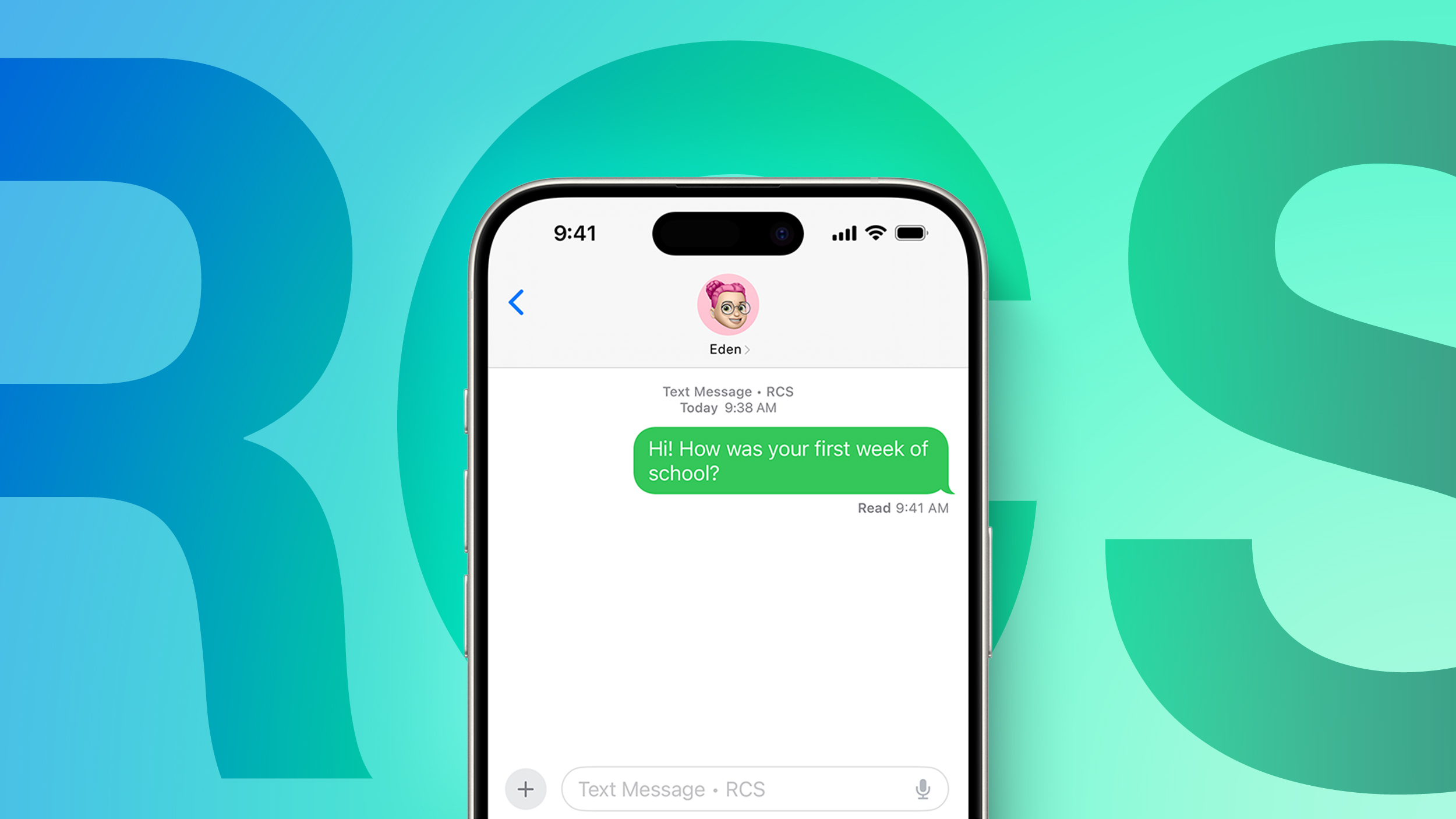
With iOS 26.4, iPadOS 26.4, and macOS Tahoe 26.4, Apple is testing end-to-end encryption (E2EE) for ‌RCS‌ messages, a security feature that is not currently available for cross-platform messaging.


Apple has been working with the GSM Association to implement E2EE for ‌RCS‌ messages. iMessage, the messaging protocol for sending texts between iPhones, has long supported end-to-end encryption. ‌RCS‌ messages between Android devices have also featured E2EE, but there was no full encryption for Android to ‌iPhone‌ (or vice versa) communications. With the addition of E2EE for ‌RCS‌, messages between ‌iPhone‌ users and Android users will eventually be just as secure as iMessage.

Messages sent by ‌RCS‌ that have end-to-end encryption will feature a lock icon in the conversation interface. As of right now, Apple is testing iPhone-to-iPhone ‌RCS‌ encryption, with the feature set to roll out for ‌iPhone‌ and Android conversations in a future iOS 26 update.

Messages that feature E2EE will feature a lock icon in the conversation UI, both for iMessages and ‌RCS‌ Messages.

Messages App


There are new animations in the Messages app for actions like launching a new conversation.

Apple Account Unified Design


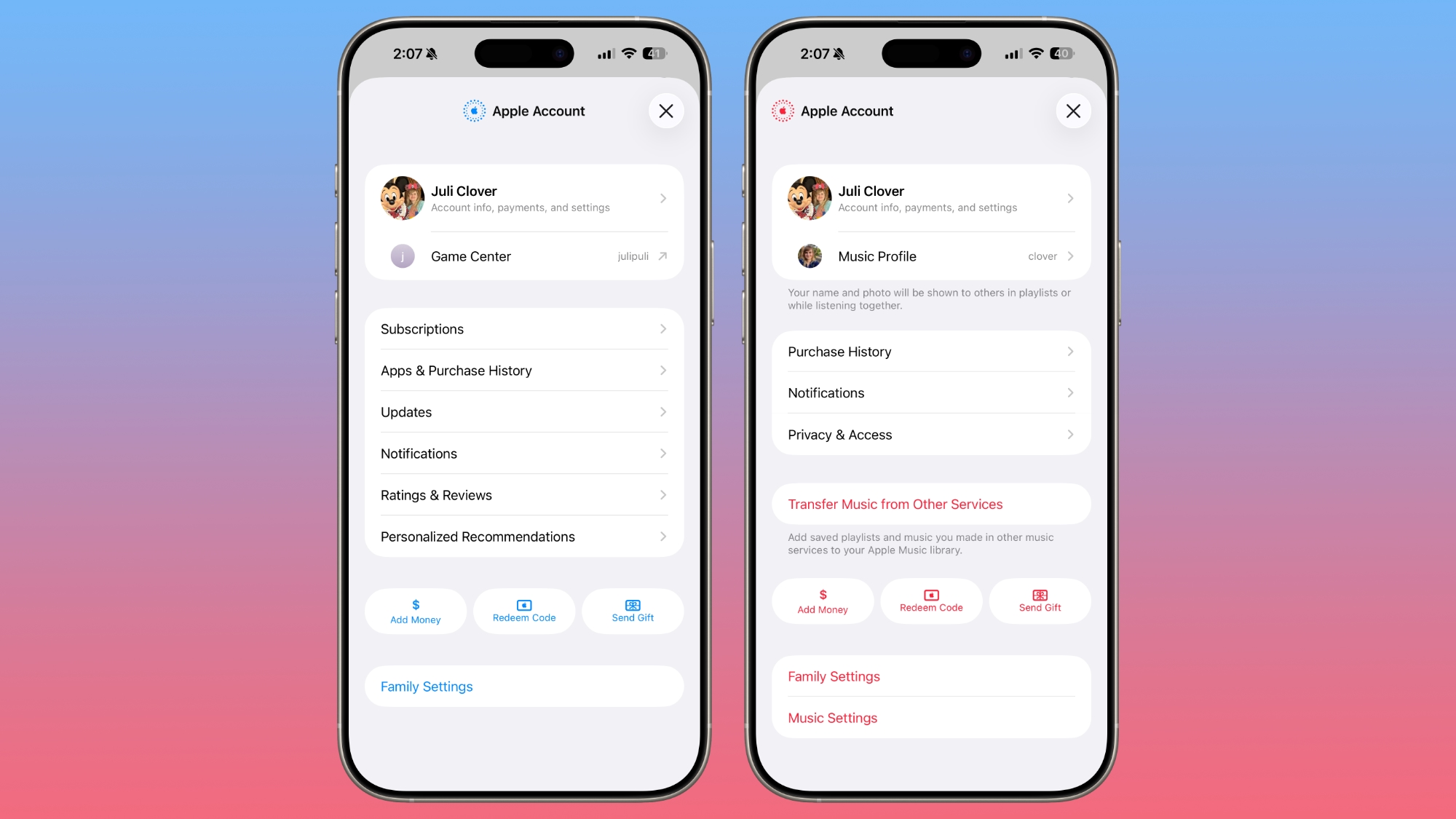
In the App Store, ‌Apple Music‌, and other apps that have user settings, there is a new unified Apple Account hub that replaces the existing profile feature.


It offers largely the same functionality as the prior profile settings for each app, but there is a new unified design.

The ‌App Store‌ merges apps and purchase history, and has a dedicated section for app updates. It now takes two taps to get to app updates rather than having them available at the bottom of the profile page.

The ‌App Store‌'s navigation bar also no longer features Search as a separate button, and the search bar itself is at the top when tapped rather than the bottom.

Ambient Music Widget


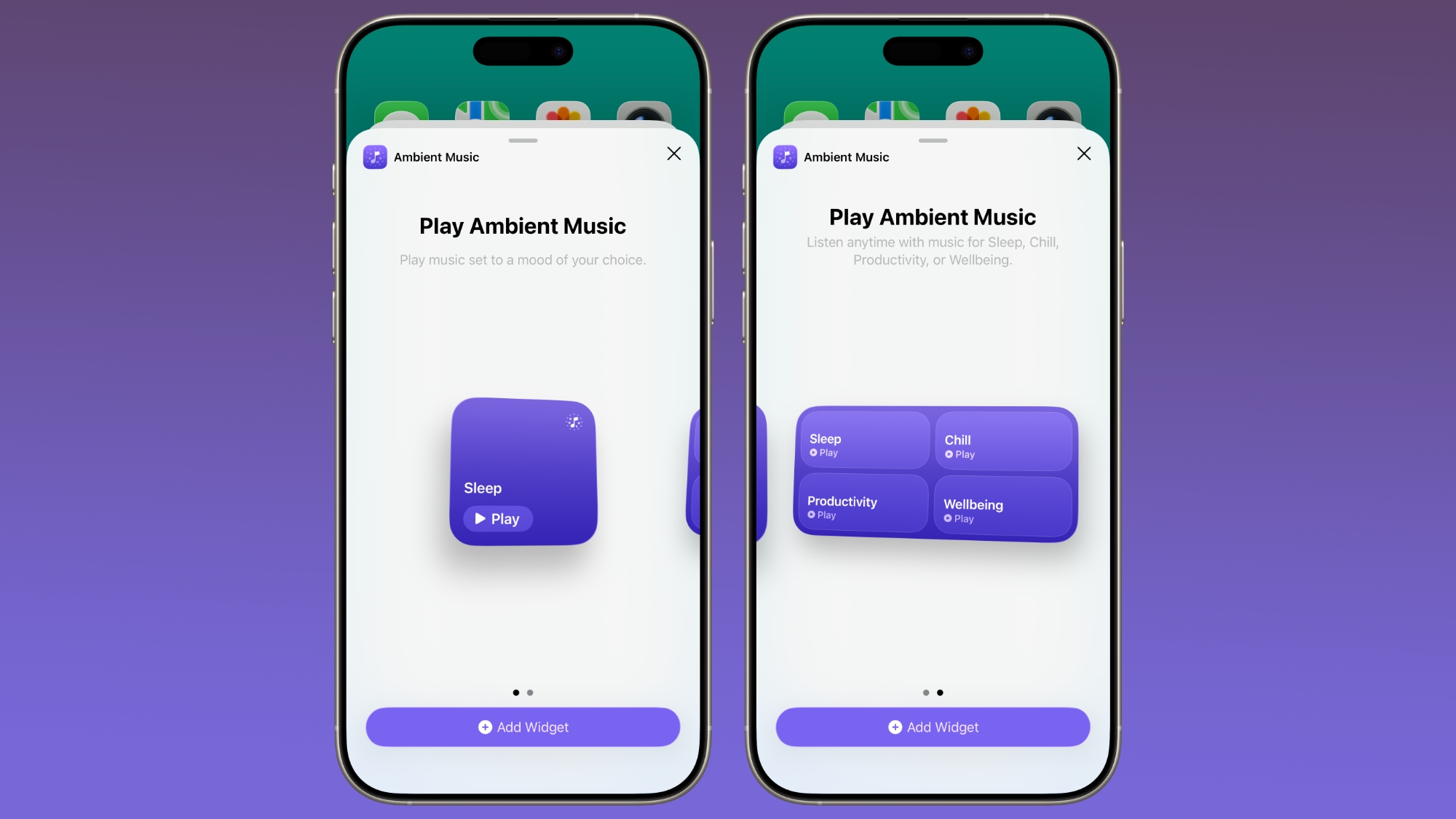
There is a new Ambient Music widget for the Home and Lock Screen. It supports playing different built-in ambient music options for sleep, productivity, wellbeing, and more.


Wallpaper and Watch Face Gallery


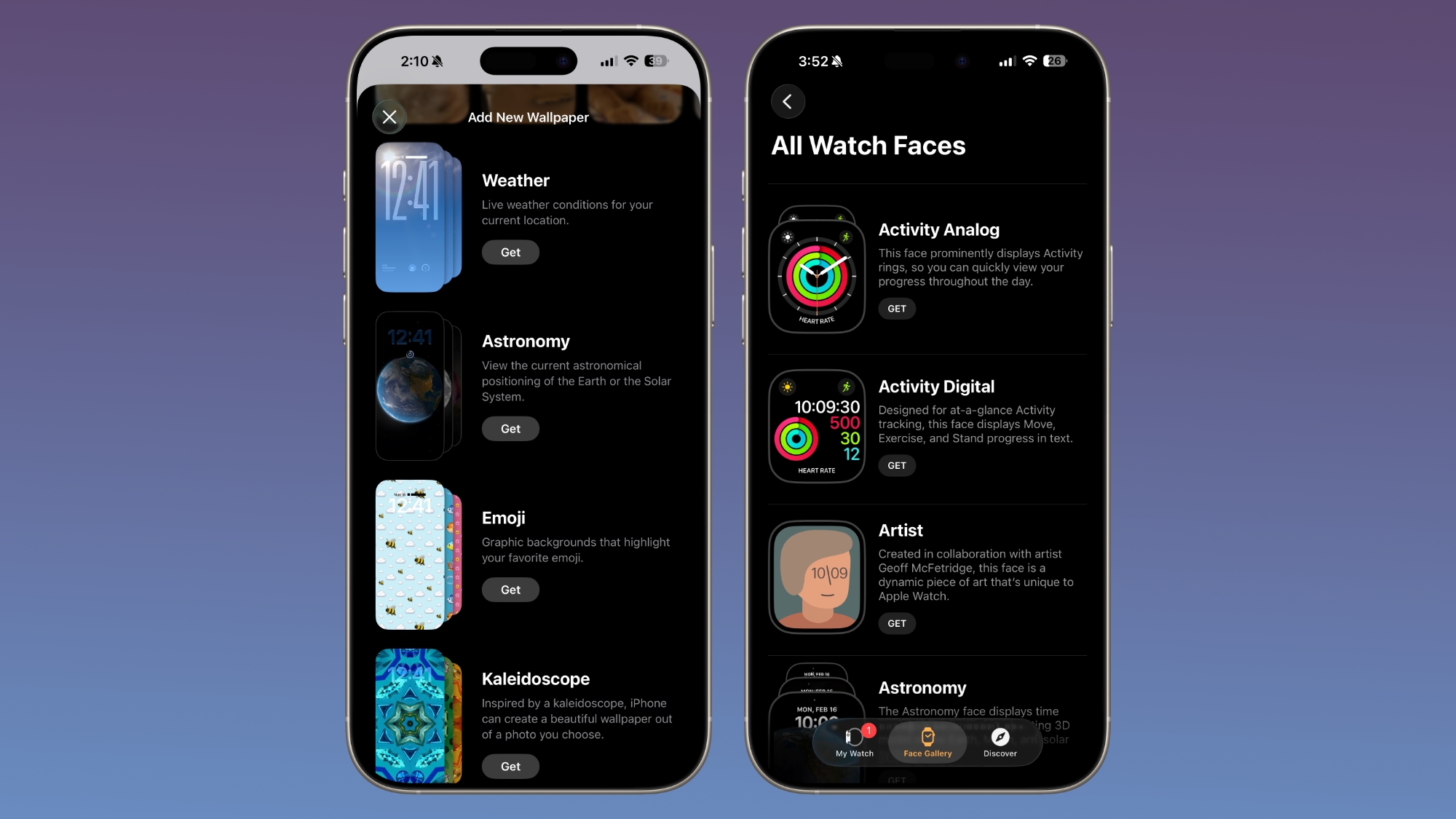
The Wallpaper Gallery has an updated design that allows Wallpapers from each category like Weather, Astronomy, Emoji, Colors and More to be downloaded to the ‌iPhone‌.


The Watch Face Gallery in the Apple Watch app also features the same design change.

Freeform Creator Studio


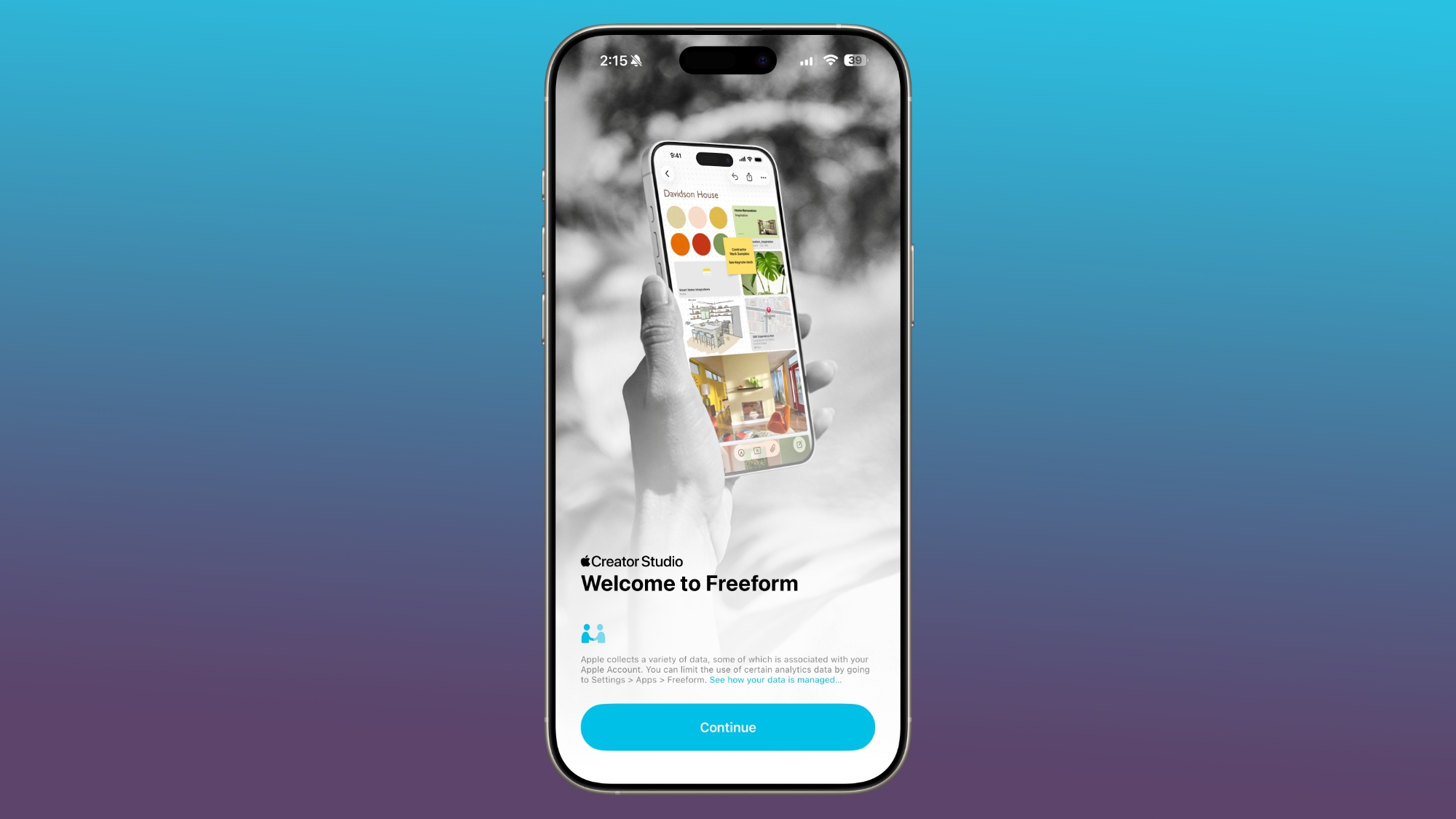
Freeform Creator Studio is live in iOS 26.4, allowing Creator Studio subscribers to access new Freeform features. Creator Studio for Freeform adds a dedicated Content Hub that houses the Freeform shape options.


Creator Studio users will be able to access free, high-quality content like graphics, photos, and illustrations that are not available to non-subscribers, plus there are AI capabilities for creating and editing images.

When Creator Studio launched, Apple said the premium content and features in Freeform would be coming to the Apple Creator Studio subscription later this year.

Freeform also has a new icon.

Reminders


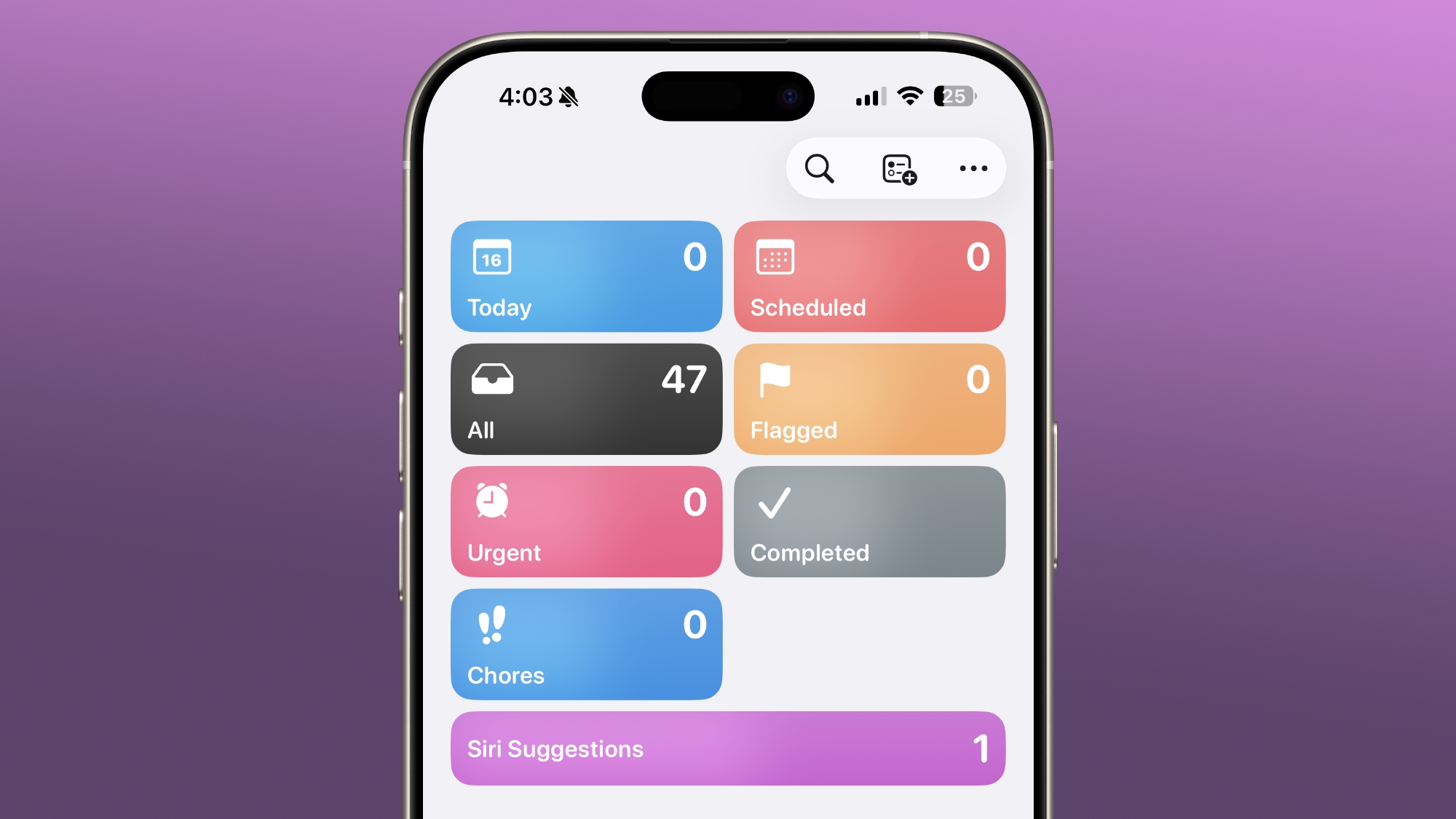
The Reminders app has a new "Urgent" section. Reminders that have Urgent toggled on during creation will show up here. Urgent ensures that reminders have an accompanying alarm so you get a clear warning when a reminder is due.


iCloud Web Settings


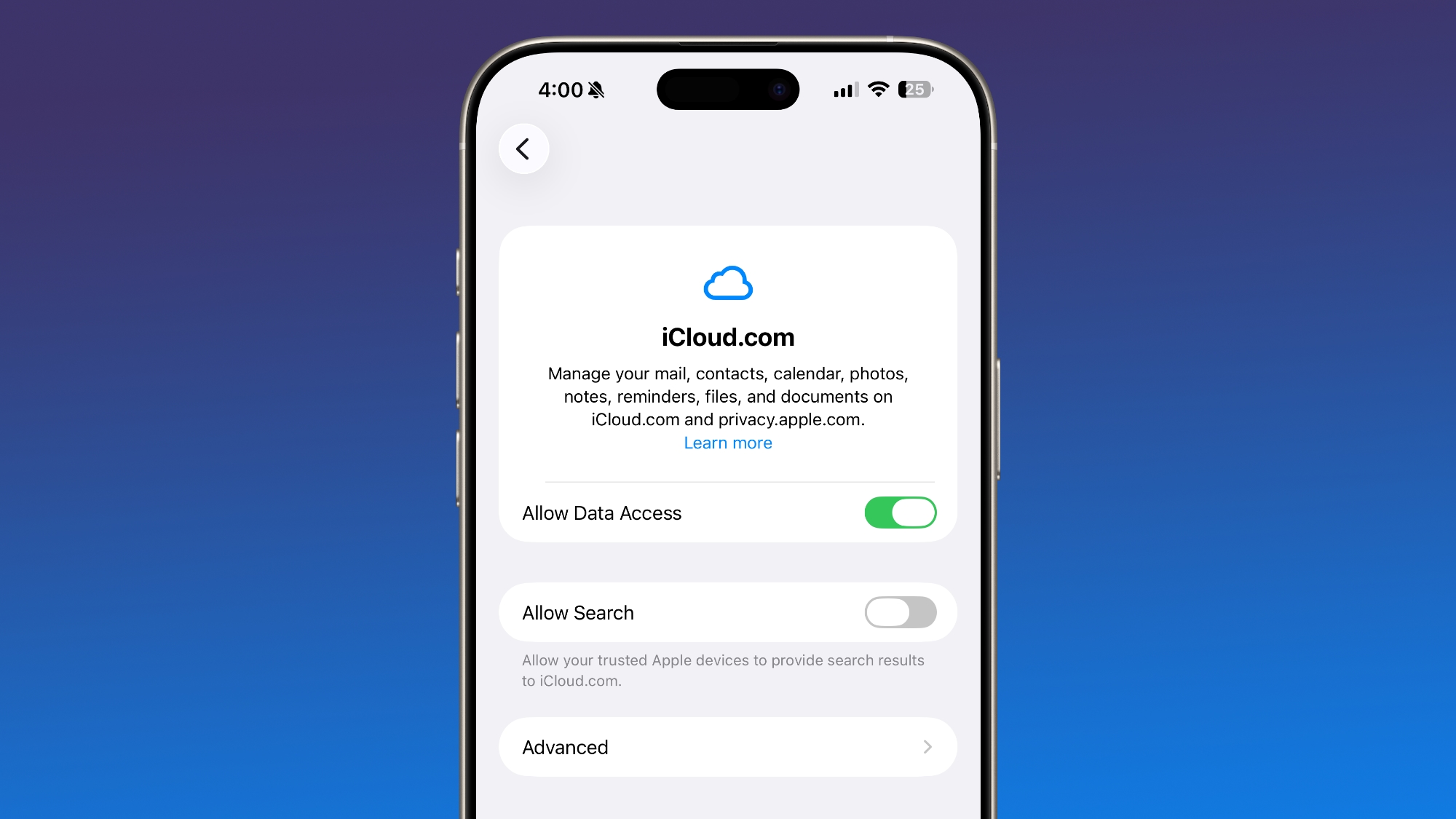
In the iCloud section of the Settings app, there's now an "iCloud.com" option if you scroll all the way to the bottom of the interface. It replaces the simple "Access ‌iCloud‌ Data on the Web" toggle that was previously available.


The setting includes a new "Allow Search" toggle that lets trusted Apple devices provide search results to iCloud.com.

New Emoji


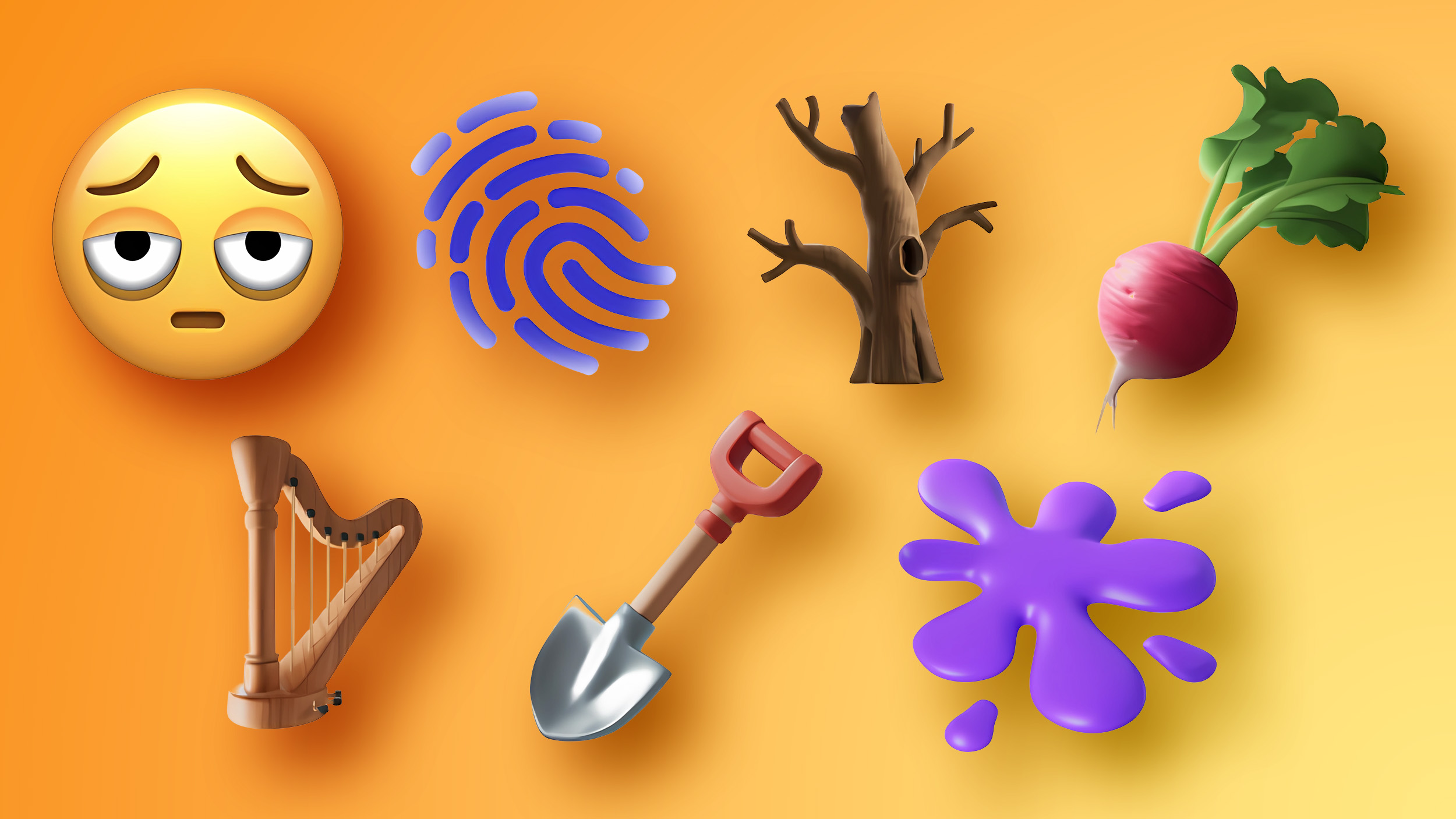
There aren't new emoji in iOS 26.4, but code suggests that new characters will be introduced in a future beta. There are references to new emoji, and we are expecting several new emoji options.


Emoji characters that are coming include trombone, treasure chest, distorted face, hairy creature (aka Bigfoot or Sasquatch), fight cloud, apple core, orca, landslide, and ballet dancers.

Notification Forwarding for Third-Party Devices (EU)


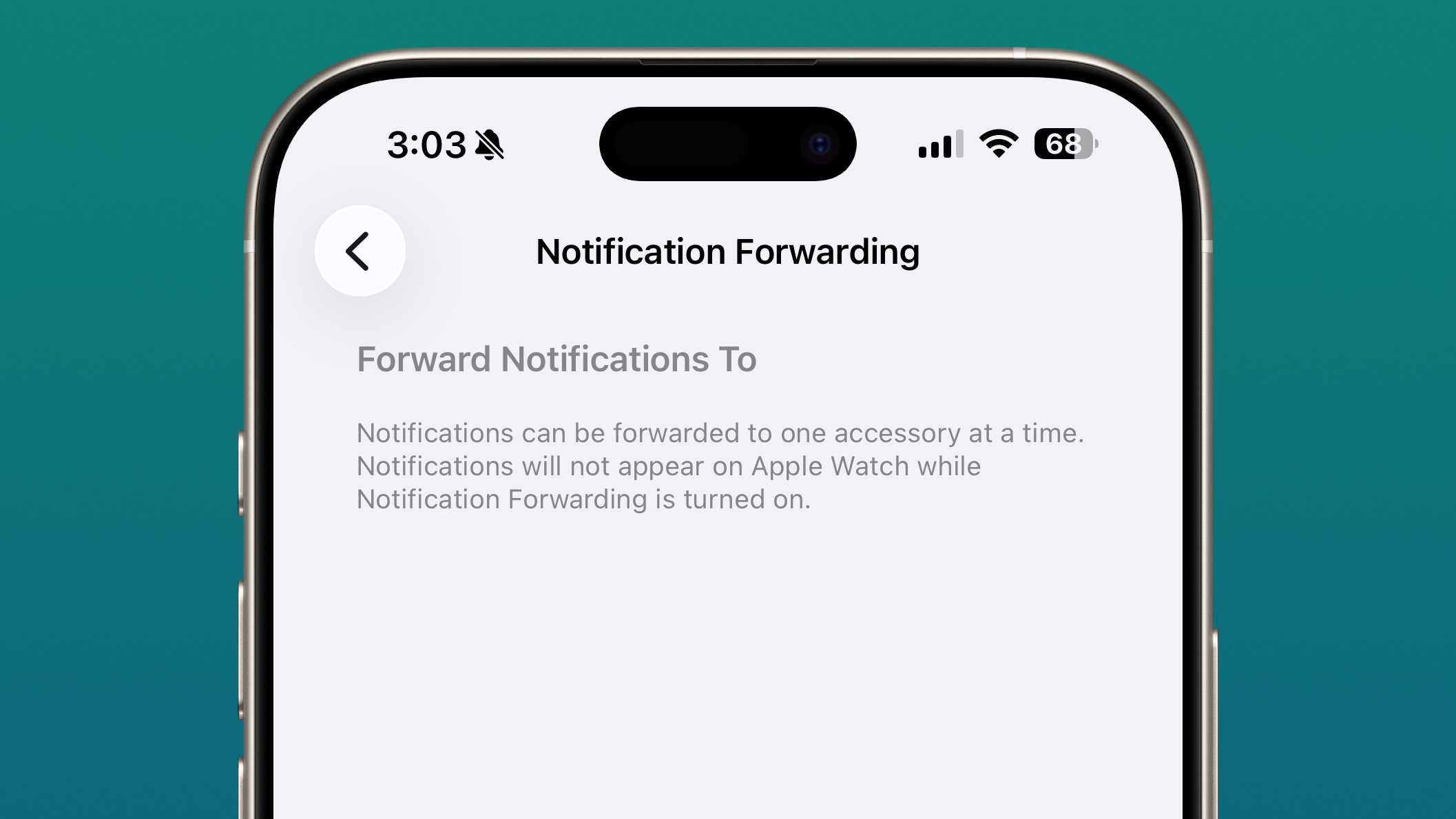
In the iOS 26.3 beta, Apple tested a new "Notification Forwarding" setting that allows incoming notifications on an ‌iPhone‌ to be forwarded to a third-party wearable device like an Android smartwatch, but it was not included in the launch version of the software. It is back in the iOS 26.4 beta.


Notifications can only be forwarded to a single device at a time, so if Notification Forwarding is enabled with a third-party wearable, the Apple Watch won't be able to receive and display notifications.

Apple is adding notification forwarding to address antitrust complaints suggesting that third-party wearables should have the same access to notifications and other features as the Apple Watch. It is limited to the European Union.

Proximity Pairing - EU Only


In the iOS 26.3 beta, Apple also tested other Europe-only changes for third-party wearables, which were shared by the European Commission, such as Proximity Pairing.

Proximity pairing allows third-party devices to pair with an iOS device in an AirPods-like one-tap way by bringing an accessory close to an ‌iPhone‌ or an iPad. Proximity Pairing was not enabled in iOS 26.3, and it too may come in iOS 26.4.
This article, "Everything New in iOS 26.4 Beta 1" first appeared on MacRumors.com

Discuss this article in our forums

  •  

Apple Brings iPhone-Style Battery Charge Limits to the Mac in macOS Tahoe 26.4

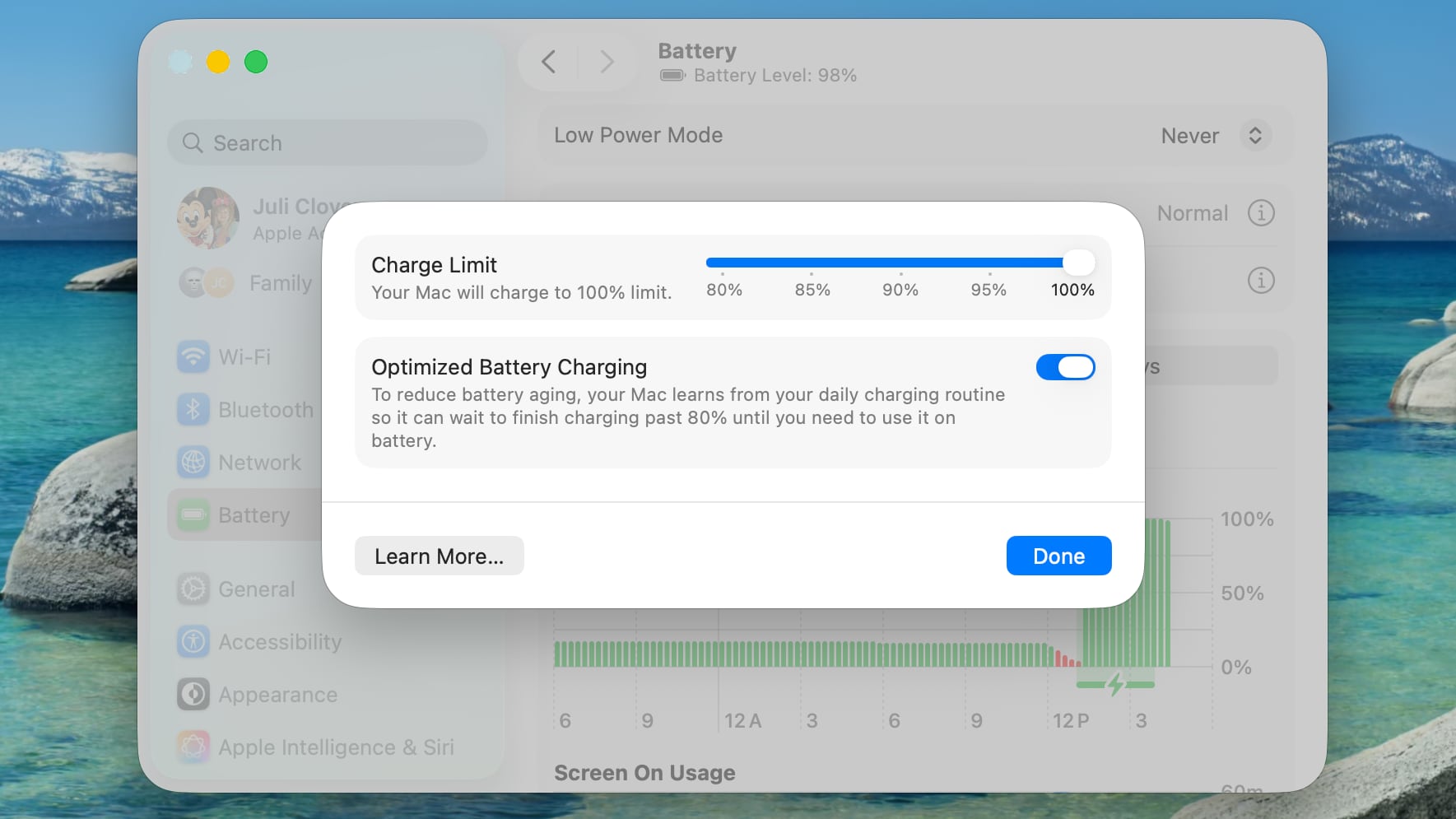
The macOS Tahoe 26.4 beta that Apple released today includes a Charge Limit feature for the Mac. There is a new slider bar that lets Mac users select a charge level from 80 percent to 100 percent.


The Charge Limit is a setting that's available in addition to Optimized Battery Charging, and it can prevent a Mac from ever charging to 100 percent.

Apple's existing Optimized Battery Charging feature keeps a Mac from charging to 100 percent until it's needed for use, with the option using your daily charging routine to determine when to charge to full. While Optimized Battery Charging can help preserve battery life, it still regularly allows a Mac to charge to 100 percent.

The new Charge Limit feature is a hard restriction that keeps a Mac's battery at 80 percent, 85 percent, 90 percent, 95 percent, or 100 percent, giving users more control over the Mac's maximum charging level. Keeping a Mac's battery at 80 percent could increase battery longevity by preserving battery health over time.

Charge Limit can be enabled by opening up the System Settings app, going to Battery, and clicking on the "i" button next to Charging.

Apple's iPhones have had a charge limit feature since the iPhone 15 lineup launched in 2023.
Related Roundup: macOS Tahoe
Related Forum: macOS Tahoe

This article, "Apple Brings iPhone-Style Battery Charge Limits to the Mac in macOS Tahoe 26.4" first appeared on MacRumors.com

Discuss this article in our forums

  •  

Compact Safari Tab Bar Returns in macOS Tahoe 26.4 and iPadOS 26.4

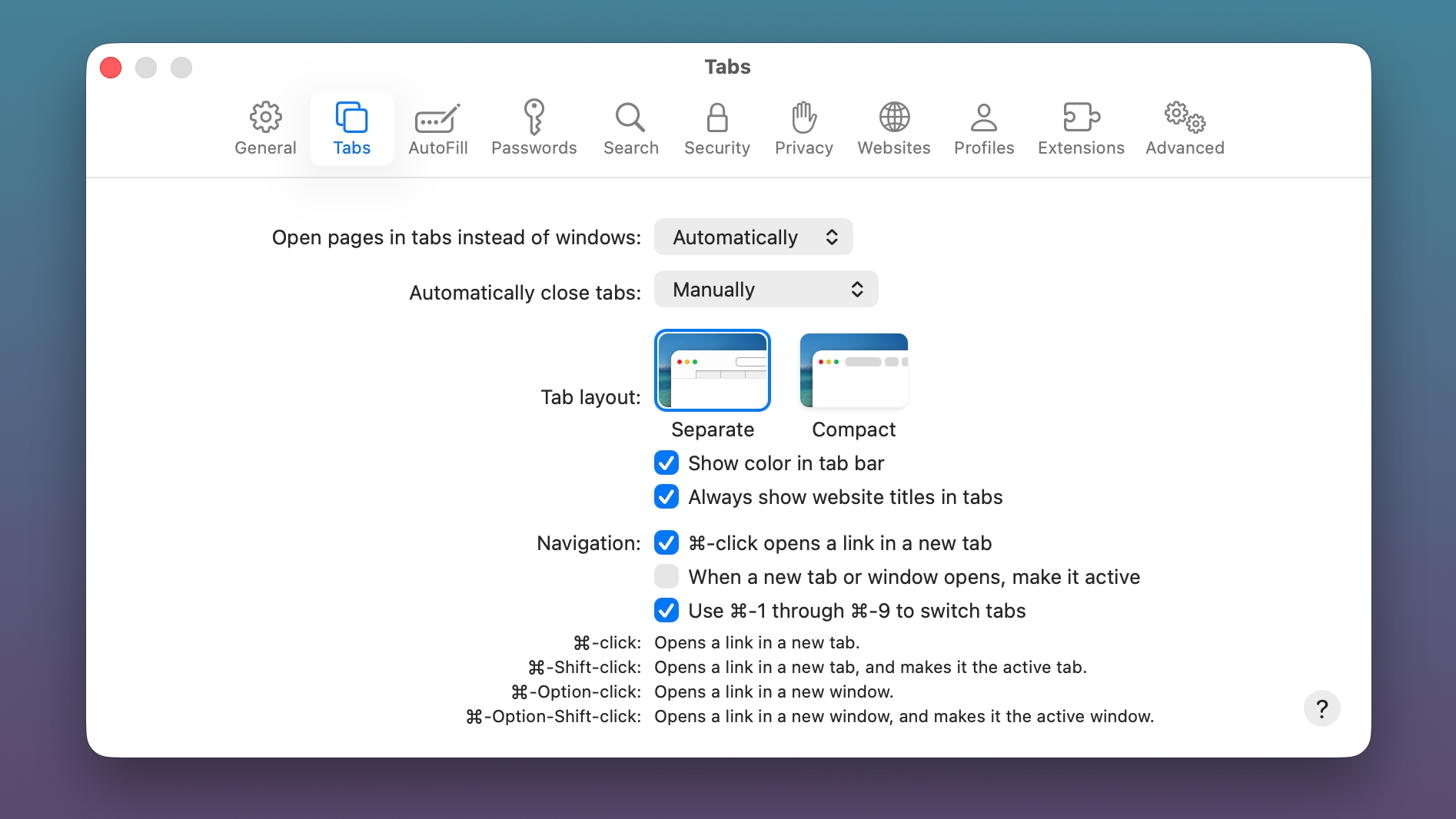
The macOS Tahoe 26.4 and iPadOS 26.4 betas that Apple released today reintroduce a compact Safari Tab Bar option for those who prefer that view option.


Apple removed the compact tab bar option with the launch of ‌macOS Tahoe‌ and iPadOS 26, but there were Mac and iPad users who missed it.

The Safari app on Mac and the Safari section of the Settings app on ‌iPad‌ both now feature an option to toggle on the Compact Tab Bar as an alternative to the standard Separate Tab Bar.

‌macOS Tahoe‌ 26.4 and iPadOS 26.4 are limited to developers right now, but Apple should release public betas soon. The software is expected to launch in the spring.
Related Roundup: macOS Tahoe
Related Forum: macOS Tahoe

This article, "Compact Safari Tab Bar Returns in macOS Tahoe 26.4 and iPadOS 26.4" first appeared on MacRumors.com

Discuss this article in our forums

  •  

Apple Music 'Playlist Playground' in iOS 26.4 Creates Playlists From Text Prompts

The iOS 26.4 update that Apple is beta testing includes a new "Playlist Playground" feature in the Apple Music app that's designed to let users create a playlist with a text-based prompt.


In the ‌Apple Music‌ app, there's an option to type in an idea and get automatic song suggestions for a playlist. Apple has some pre-set suggestions that include "morning coffee music," "hip-hop party songs," and "disco songs that defined the 1970s," but you can type in any idea, mood, or feeling.

From there, the Playlist Playground feature will automatically generate a list of 25 songs, along with a custom title. Playlists that you create can be customized further with additional text prompts, and you can select a cover and a description.

The Playlist Playground is available in the iOS 26.4 beta, and you can get to it by opening up ‌Apple Music‌, tapping into the Library, and tapping on the "+" button to create a new playlist. If it doesn't show up, you may need to restart your device or the ‌Apple Music‌ app.

Playlists can be shared and displayed on your profile, similar to standard playlists.

iOS 26.4 is limited to developers right now, but Apple will likely release a public beta in the near future. The software will launch in the spring.
Related Roundups: iOS 26, iPadOS 26
Related Forum: iOS 26

This article, "Apple Music 'Playlist Playground' in iOS 26.4 Creates Playlists From Text Prompts" first appeared on MacRumors.com

Discuss this article in our forums

  •  

macOS Tahoe 26.4 Displays Warnings for Apps That Won't Work After Rosetta 2 Support Ends

macOS Tahoe will be the last version of macOS that supports Intel-based Macs, with Apple planning to phase out Intel Macs entirely following its transition to Apple silicon.


Apple today reminded developers and users that future versions of macOS will not support Intel machines, and Rosetta 2 support for apps will end after macOS 27.

Starting with ‌macOS Tahoe‌ 26.4, when users launch an app that uses Rosetta 2, there will be a popup letting them know that the app will no longer work when support for Rosetta 2 ends.

Apple says that it will continue to support older, unmaintained gaming titles with Rosetta along with software running Intel binaries in Linux VMs beyond macOS 27. There could also be future security fixes.

Apple first announced plans to stop supporting Intel Macs with new versions of macOS back in June 2025 when it debuted ‌macOS Tahoe‌ at WWDC.

Apple started its transition to Apple silicon with the 2020 launch of the M1 Mac machines, and three years ago, the company completed the transition to Apple silicon with the Apple silicon Mac Pro.

macOS 27 will launch in September 2026, so the end of support for Intel-based Macs is approaching.
This article, "macOS Tahoe 26.4 Displays Warnings for Apps That Won't Work After Rosetta 2 Support Ends" first appeared on MacRumors.com

Discuss this article in our forums

  •  

Apple Releases New Public Beta Firmware for AirPods Pro 2, AirPods Pro 3 and AirPods 4

Apple today released new public beta firmware for the AirPods Pro 2, AirPods Pro 3, and AirPods 4. The firmware is limited to developers and public beta testers at the current time, and it has a build number of 8B5034f. Apple first provided this firmware last week, but it was only available to developers at the time.


Apple today started testing iOS 26.4, so it's possible the new firmware includes features related to the iOS 26.4 beta.

With iOS 26, iPadOS 26, and macOS Tahoe, Apple added a beta firmware update installation option that's available from the AirPods settings interface when the AirPods are connected to an iPhone, iPad, or Mac, which facilitates beta testing.

Developers and public beta testers can use the beta option to turn on beta downloads.
This article, "Apple Releases New Public Beta Firmware for AirPods Pro 2, AirPods Pro 3 and AirPods 4" first appeared on MacRumors.com

Discuss this article in our forums

  •  

iOS 26.4 Enables Stolen Device Protection by Default for All iPhones

Starting with iOS 26.4, Stolen Device Protection will be enabled by default and turned on for all iPhone users. Stolen Device Protection adds extra security in case of physical ‌iPhone‌ theft.


Apple implemented Stolen Device Protection back in 2023 after reports about a new ‌iPhone‌ theft method. Thieves would spy on an intended victim to learn their passcode, then steal the target's ‌iPhone‌. With the passcode, criminals were able to empty bank accounts, access passwords, and turn off Find My.

Stolen Device Protection requires additional authentication through Face ID or Touch ID to access certain ‌iPhone‌ features like the Passwords app, Lost mode in ‌Find My‌, Safari purchases, and more. Some features are disabled entirely without authentication, while others have a one-hour security delay.

Actions requiring ‌Face ID‌ or ‌Touch ID‌ to complete:

  • Viewing/using passwords or passkeys saved in iCloud Keychain

  • Applying for a new Apple Card

  • Viewing an ‌Apple Card‌ virtual card

  • Turning off Lost Mode

  • Erasing all content and settings

  • Taking certain Apple Cash and Savings actions in Wallet

  • Using payment methods saved in Safari

  • Using your ‌iPhone‌ to set up a new device


These actions do not have a passcode backup, so you can't use a passcode to avoid using ‌Face ID‌ or ‌Touch ID‌.

Actions that have a 1-hour security delay, and require two biometric authentications:

  • Changing your Apple ID password

  • Updating select ‌Apple ID‌ account security settings, including adding or removing a trusted device, trusted phone number, Recovery Key, or Recovery Contact

  • Changing your ‌iPhone‌ passcode

  • Adding or removing ‌Face ID‌ or ‌Touch ID‌

  • Turning off ‌Find My‌

  • Turning off Stolen Device Protection


Prior to iOS 26.4, Stolen Device Protection had to be enabled manually in the ‌Face ID‌ and Passcode section of the Settings app. There is an option to remove security delays when the ‌iPhone‌ is in a familiar location, which allows full functionality at home but protection when out and about.

iOS 26.4 is limited to developers at the current time, but a public beta will be coming in the near future. Apple plans to release the update in the spring.
Related Roundups: iOS 26, iPadOS 26
Related Forum: iOS 26

This article, "iOS 26.4 Enables Stolen Device Protection by Default for All iPhones" first appeared on MacRumors.com

Discuss this article in our forums

  •  

Apple Begins Testing End-to-End Encryption for RCS Messages in iOS 26.4 Beta

Apple is testing secure messaging between Android and iOS devices with iOS 26.4, iPadOS 26.4, and macOS Tahoe 26.4. The updates introduce end-to-end encryption (E2EE) for RCS messages, a security feature that is not currently available for cross-platform messaging.

Apple has been working with the GSM Association to implement E2EE for ‌RCS‌ messages. iMessage, the messaging protocol for sending texts between iPhones, has long supported end-to-end encryption. ‌RCS‌ messages between Android devices have also featured E2EE, but there was no full encryption for Android to iPhone (or vice versa) communications. With the addition of E2EE for ‌RCS‌, messages between ‌iPhone‌ users and Android users will eventually be just as secure as iMessage.

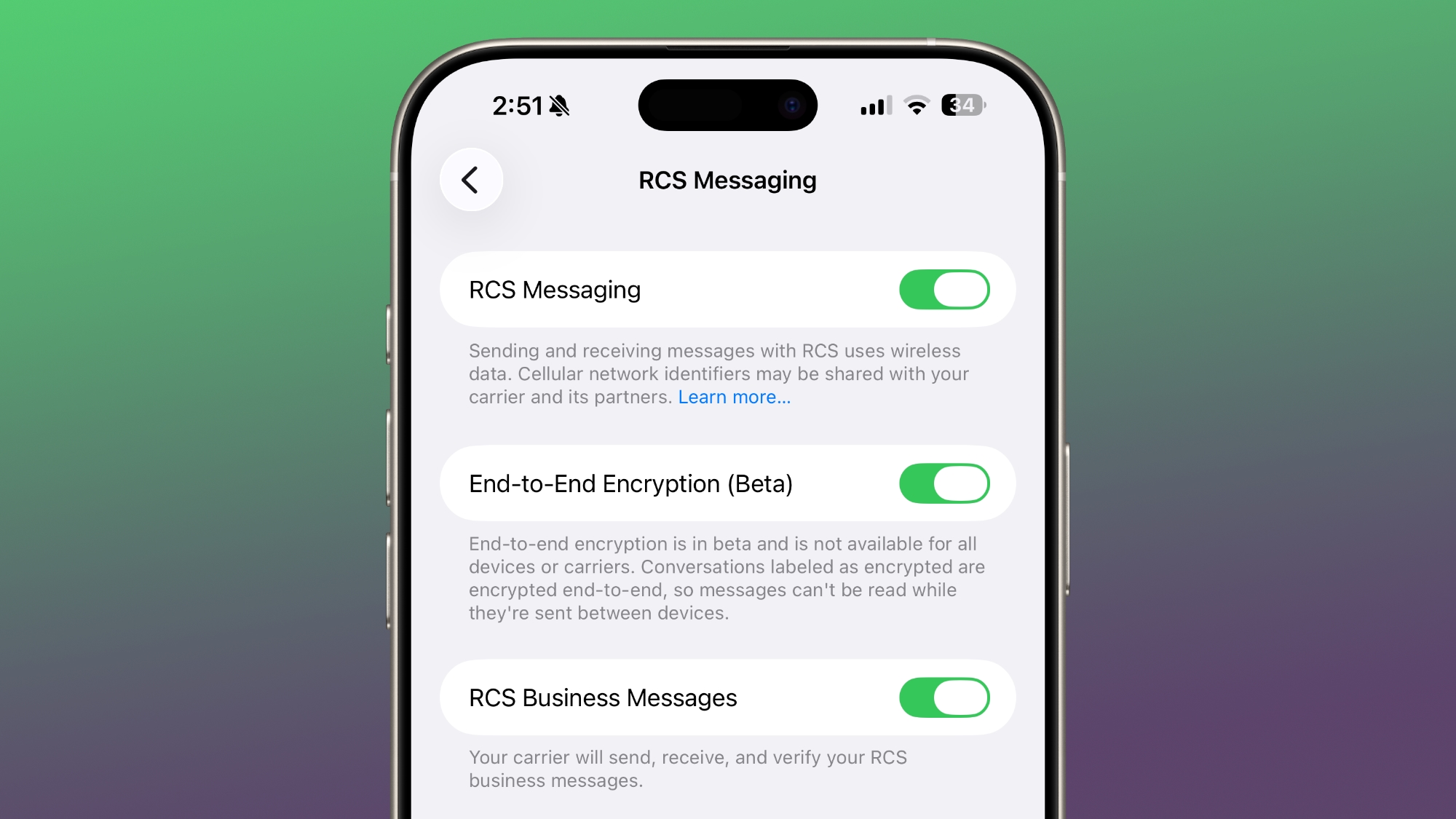
Developers running the iOS 26.4 beta will see a new switch in the Settings app that's turned on by default. The toggle enables testing end-to-end encrypted ‌RCS‌ messaging for supported devices and carriers. Most carriers that support ‌RCS‌ will also support ‌RCS‌ end-to-end encryption, according to Apple. During the first beta, ‌RCS‌ encryption is available for testing Apple devices only when iMessage is disabled.

‌iPhone‌ users who have the beta installed will see a lock icon in ‌RCS‌ chats, with the icon indicating that E2EE is enabled. The lock icon will also now appear in iMessage chats.

‌RCS‌ End-to-end encryption for Apple devices will roll out to beta users gradually, so not everyone will have access right away. Encryption will become available over time, and you can tell if it's enabled through the lock icon.

Cross-platform testing between ‌iPhone‌ users and Android users will begin at a later date.

E2EE for ‌RCS‌ will require Apple to update to ‌RCS‌ Universal Profile 3.0, which the GSMA published with Apple's input. Apple currently supports ‌RCS‌ Universal Profile 2.4. ‌RCS‌ Universal Profile 3.0 will also add features for editing text messages, deleting text messages, and replying to specific messages inline during cross-platform conversations.

Apple released the first betas of iOS 26.4, iPadOS 26.4, and ‌macOS Tahoe‌ 26.4 today, with the updates available for developers. Apple plans to launch the updates in the spring, but while E2EE is in testing, the full functionality is not expected until a later iOS 26 update.
Related Roundups: iOS 26, iPadOS 26
Tag: RCS
Related Forum: iOS 26

This article, "Apple Begins Testing End-to-End Encryption for RCS Messages in iOS 26.4 Beta" first appeared on MacRumors.com

Discuss this article in our forums
  •  

Apple Podcasts Getting Video Episodes in iOS 26.4

With iOS 26.4, Apple is adding video podcast capabilities to the Apple Podcasts app. The feature uses HTTP Live Streaming (HLS) to provide podcast creators with "unprecedented control and monetization opportunities" while also providing a high-quality viewing experience.


"Twenty years ago, Apple helped take podcasting mainstream by adding podcasts to iTunes, and more than a decade ago, we introduced the dedicated Apple Podcasts app," said Eddy Cue, Apple's senior vice president of Services. "Today marks a defining milestone in that journey. By bringing a category-leading video experience to Apple Podcasts, we're putting creators in full control of their content and how they build their businesses, while making it easier than ever for audiences to listen to or watch podcasts."

The iOS 26.4 Podcasts app will let users switch between watching and listening to shows, with videos able to be downloaded for offline viewing. HLS ensures smooth playback regardless of network connection, so videos will work on Wi-Fi or cellular. Apple says that the video episodes will integrate with existing ‌Apple Podcasts‌ features, including personalized recommendations and editorial suggestions in the New and Category sections.

Creators are able to distribute through participating hosting providers and ad networks, with Acast, ART19, Omny Studio, and SiriusXM brands supporting HLS video at launch. Creators will be able to dynamically insert video ads for broader video advertising opportunities.

The Podcasts app previously supported video podcasts via RSS, but the iOS 26.4 feature is a streamlined, native option for creating and monetizing video podcasts.

Podcasters can find more information on the new video feature through Apple's podcasts website. HLS video is available for testing today in the beta versions of iOS 26.4, iPadOS 26.4, and visionOS 26.4. iOS 26.4 will be released in the spring.
Related Roundups: iOS 26, iPadOS 26
Related Forum: iOS 26

This article, "Apple Podcasts Getting Video Episodes in iOS 26.4" first appeared on MacRumors.com

Discuss this article in our forums
  •  

Apple Seeds First Betas of iOS 26.4 and iPadOS 26.4 to Developers

Apple today seeded the first betas of upcoming iOS 26.4 and iPadOS 26.4 updates to developers for testing purposes, with the software coming less than a week after Apple released iOS 26.3 and iPadOS 26.3.


Registered developers can download the betas from the Settings app on the iPhone or iPad by going to the General section and selecting Software Update.

iOS 26.4 and iPadOS 26.4 could be significant updates that will introduce several new features. We were counting on the betas to include the smarter, more personalized version of Siri that Apple first debuted at WWDC 2024, but Apple has apparently run into issues that could see some or all ‌Siri‌ features delayed until iOS 26.5 or iOS 27.

We could still get some new ‌Siri‌ capabilities, such as tools for generating images and searching the web.

The update is also expected to include new emoji characters, such as trombone, treasure chest, orca, landslide, and Bigfoot.

iOS 26.4 and iPadOS 26.4 are limited to developers at the current time, but Apple will likely release a public beta in the next week or two.
Related Roundups: iOS 26, iPadOS 26
Related Forum: iOS 26

This article, "Apple Seeds First Betas of iOS 26.4 and iPadOS 26.4 to Developers" first appeared on MacRumors.com

Discuss this article in our forums

  •  

First macOS Tahoe 26.4 Beta Now Available for Developers

Apple today provided the first beta of an upcoming macOS Tahoe 26.4 update to developers for testing purposes, with the update coming just a few days after Apple launched ‌macOS Tahoe‌ 26.3.


Developers can download the ‌macOS Tahoe‌ 26.4 update by opening up the System Settings app, selecting the General category, and then choosing Software Update. Beta Updates will need to be enabled, and a free developer account is required.

‌macOS Tahoe‌ 26.4 could introduce some new Siri features, though at least some of the capabilities that we were expecting have been delayed. The update is also expected to introduce new emoji characters.

The beta is available to developers right now, but a public beta is expected in the next week or two.
Related Roundup: macOS Tahoe
Related Forum: macOS Tahoe

This article, "First macOS Tahoe 26.4 Beta Now Available for Developers" first appeared on MacRumors.com

Discuss this article in our forums
  •  

Apple Releases First watchOS 26.4, tvOS 26.4 and visionOS 26.4 Betas

Apple today provided developers with the first betas of upcoming watchOS 26.4, tvOS 26.4, and visionOS 26.4 betas for testing purposes. The software comes a few days after Apple launched the 26.3 versions of each platform.


The software updates are available through the Settings app on each device, and because these are developer betas, a free developer account is required.

The updates are expected to introduce new emoji characters, plus there could be new Siri capabilities, but we don't know exactly what's in the software as of yet.

Apple will likely provide public beta testers with access to the tvOS 26.4 and watchOS 26.4 betas later this month, but visionOS 26.4 will remain limited to developers. The software updates will probably launch in mid-to-late March.
This article, "Apple Releases First watchOS 26.4, tvOS 26.4 and visionOS 26.4 Betas" first appeared on MacRumors.com

Discuss this article in our forums
  •  

Three New Apple Home Products Rumored for 2026

Apple has a long list of new products rumored for 2026, including a series of home products that will see the company establishing more of a presence in the smart home space. Robots are on the horizon for 2027, but the 2026 releases will be a little tamer.


HomePod mini


We're expecting a new HomePod mini 2 to launch at any time. Apple isn't going to update the device's design, but we could get new colors. The ‌HomePod mini‌ 2 will have an updated S-series chip based on the Apple Watch Series 10 chip, and there's a possibility for sound improvements and improved real-time computational audio. Apple will also likely upgrade to Bluetooth 5.3 for connectivity improvements, and it could get a second-generation Ultra Wideband chip.

The current ‌HomePod mini‌ is $99, and that's not expected to change.

Home Hub


Apple has been working on a home hub that will serve as a centralized location for all members of the family to control smart home devices, make calls, listen to music, get information like the weather, use Siri, view photos, see a family calendar, and more.

Rumors suggest the home hub will have presence sensors to detect when someone is in the room, and an included camera could be able to tell who is speaking to it so that it can pop up a personalized selection of apps and features for each user.

The home hub is expected to have Face ID, built-in speakers, and support for Apple Intelligence thanks to an A18 chip. While there won't be a dedicated App Store, the home hub will run Apple apps like Safari, Apple Music, Notes, Calendar, Photos, and Apple News.

There are two separate models, including one that's designed to be mounted on the wall and one that has a speaker base that looks like a ‌HomePod mini‌.

Security Camera and Doorbell Camera


Apple is designing its own indoor security cameras that will connect to Apple Home and interface with the home hub. We've also heard rumors of a potential doorbell camera with ‌Face ID‌ that would be able to connect to a door lock.

Any Apple-designed cameras will feature HomeKit Secure Video with end-to-end encryption, but little else is known at this time. There has been mixed information on when we might see Apple's security cameras, but they could come as early as 2026.

Launch Timing


The ‌HomePod mini‌ and home hub are expected early in the year, likely before WWDC. The cameras, if we get them in 2026, will likely come late in the year. Prior rumors suggested that Apple would release the home hub around the time that the new version of ‌Siri‌ launches. The smarter ‌Siri‌ was expected in iOS 26.4, but it may now be pushed back to iOS 26.5.

Read More


For more on what to expect from Apple in 2026, we have a dedicated Apple Products guide that lists all of the devices on the horizon. We update it regularly, so it's a useful guide to bookmark and check every now and then to keep up to date with Apple's plans.
This article, "Three New Apple Home Products Rumored for 2026" first appeared on MacRumors.com

Discuss this article in our forums
  •  

Is Apple Phasing Out the iWork Brand?

With the launch of the Creator Studio subscription app offering, Apple may be phasing out the iWork branding that it has used since 2005 for Pages, Keynote, and Numbers.


Apple today removed the iWork section on its website, and the URL now redirects to a more generic "apps" page that features Creator Studio, Apple Arcade, Apple Invites, Image Playground, and other Apple apps.

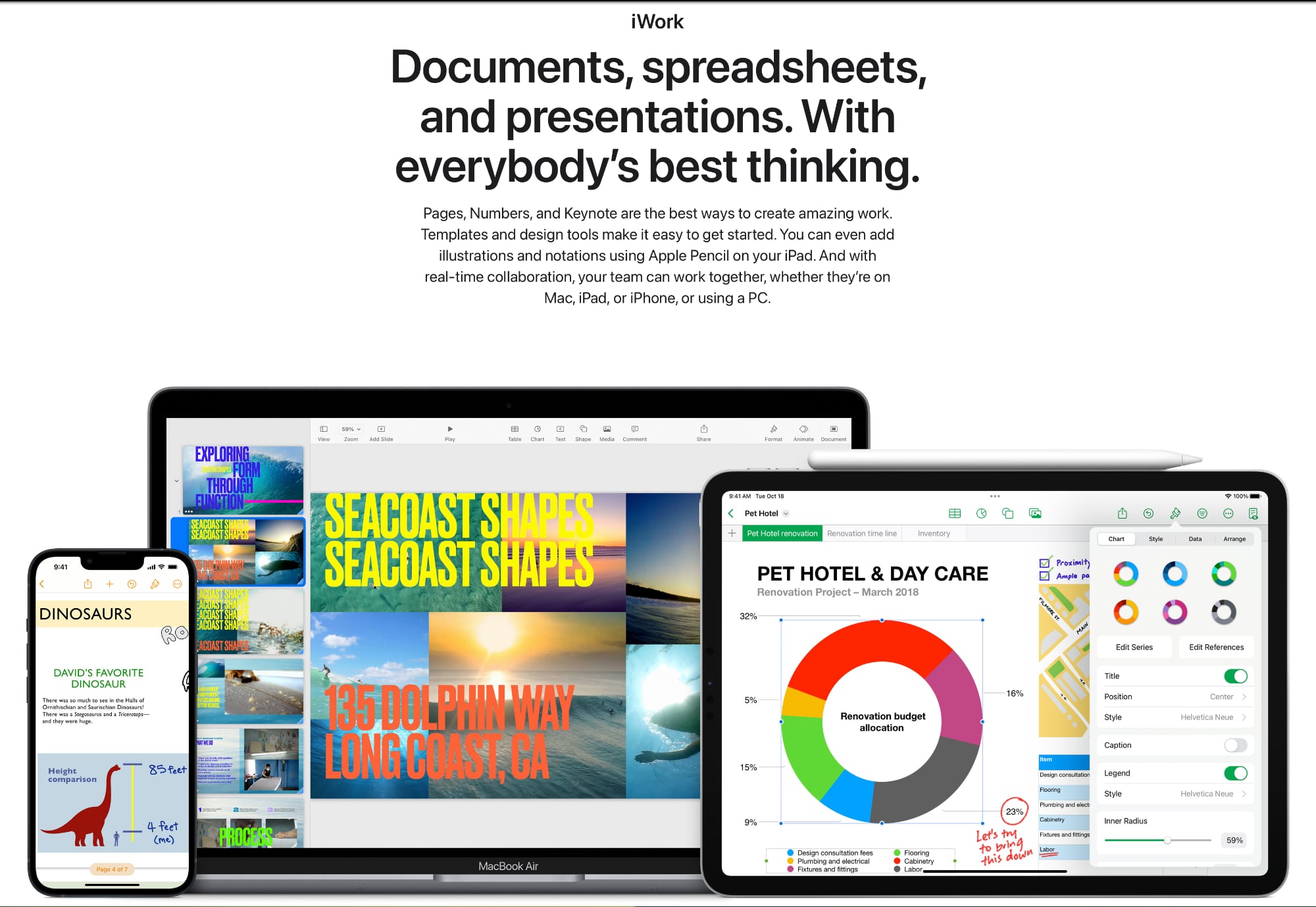
The iWork page that Apple removed was dedicated solely to Pages, Numbers, and Keynote, featuring information on each app along with a link. Apple's apps page offers some of the same information in a dedicated productivity section, but with additional details on the premium features included in Pages, Numbers, and Keynote with Apple Creator Studio.

The apps page does not mention the iWork branding at all, suggesting that Apple is no longer referring to the three productivity apps using that term and is instead going to advertise them as Apple Creator Studio apps.

Apple's now-removed iWork page

It's not clear if Apple is going to phase out "iWork" entirely, and the term is still used across different support documents and guides. It may take time to completely eliminate the all-in-one branding that Apple has used for Pages, Numbers, and Keynote for more than 20 years, or it could still be used in some limited situations.

Apple introduced Keynote as a standalone app in 2003, and added Pages in January 2004. A year later, both apps were bundled together under the iWork '05 name, with the software priced at $79. Apple said iWork was a successor to AppleWorks, an office suite that included a word processing app, a database, a drawing app, and a spreadsheet app. The iWork apps were designed from the ground up, and were essentially the Mac equivalent to Microsoft Office.

In 2007, iWork '08 gained the Numbers app, and in 2009, iWork '09 included an iWork.com service for sharing documents online (discontinued in 2012 in favor of iCloud). When iWork '09 came out, Apple started selling the apps for $20 each, later adding them to the Mac App Store when it launched in 2011. iOS versions of the iWork apps came in 2010 with the launch of the first iPad, with Apple charging $9.99 each.

Apple redesigned the iWork apps for Mac and iOS in 2013, and started offering them for free to Mac buyers. Pages, Keynote, and Numbers remain free today, though there are now upgraded features accessible only through the Apple Creator Studio subscription.

Apple Creator Studio is priced at $12.99 per month, and in addition to the iWork apps, it includes access to Final Cut Pro, Logic Pro, Pixelmator Pro, Motion, Compressor, and MainStage. For Numbers, Pages, and Keynote, Apple Creator Studio adds a content hub with Apple-curated royalty-free photos, premium templates, and themes. There's also a tool to remix image creations right in a document, and a Super Resolution tool for upscaling images.

In addition to iWork, Apple has been phasing out other "i" branding terms over the last several years. iBooks and iPhoto are now Apple Books and Photos, respectively, while iTunes has been separated into Apple Music, Apple TV, and Apple Podcasts. Apple still uses "i" branding for iMovie, ‌iCloud‌, iPhone, ‌iPad‌, and iMac.
Tag: iWork

This article, "Is Apple Phasing Out the iWork Brand?" first appeared on MacRumors.com

Discuss this article in our forums

  •  
❌